Technical Services Manual
Copy Cataloging
Rohrbach Library Kutztown University
Kutztown, PA 19530
Bibliographic Record
Page under construction! Please go use the previous edition of this page.
Note: Paperback art books go to the bindery first.
Leader
Ctrl + F opens the Form Editor to view and edit the field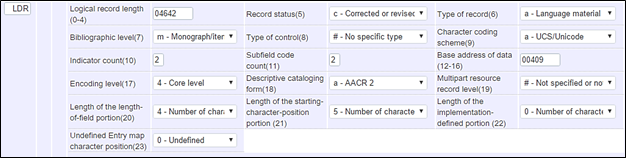
Acceptable values:
Record status: a, c, n, p
Type of record: a
Bibliographic level: m
Type of control: any
Encoding level: _(blank), 1, 4, 8, M
Descriptive Cataloging form: a,i
008 Field
Ctrl + F opens the Form Editor to view and edit the field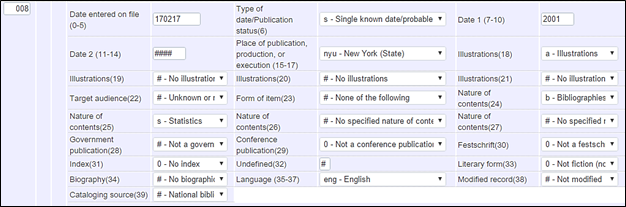
Compare the information in the 008 to the information in the bibliographic record to make sure there are no discrepancies:
Publication status: Is there a single date of publication, two dates, or a range of dates?
Date 1 and 2: Should match the date in the record
Place of publication: Should match the first-named place in the record
Illustrations 1: Is the book illustrated? If so, enter “a” in Illustrations 1.
Audience: Do not change
Form of item: Do not change
Contents: Select all that apply
Government publication: Select appropriate value
Conference publication: Select 1 if a conference publication
Festscrift: Do not change
Index: Select 1 if the book has an index
Literary form: Select appropriate value
Biography: Select appropriate value
Language: Select appropriate value
Modified record: Do not change
Cataloging source: Do not change
010 – Library of Congress Control Number
Check against book. Insert an 010 field for the LCCN if none exists AND all the other bibliographical information in the record matches the book.020 – ISBN
Check against book. Insert an 020 field for the ISBN if none exists AND all the other bibliographical information in the record matches the book. (Note: occasionally CIP information is included for an earlier edition of the book in hand. If that is the case, do not use the data in the CIP section.049 – Local Holdings Symbol
Change the 049 field to the OCLC holdings symbol that matches the library collection in which the book will be shelved. Watch for large books that should be cataloged in the Oversize Collection.
050, 090, 099 – Call Number
Library Science collection: use call number scheme described in Easy, Fiction & Bio
Main or Oversize collections: follow the instructions below.
The 050 field is a Library of Congress assigned LC call number. In most cases KU uses the call number in the 050. Even if the call numbers is not being used, do not delete or edit 050 fields.
The 090 field is used when the 050 does not meet our local needs. It contains a locally assigned call number in LC format. The 050 call number may be in a classification section that we do not use, it may have two subfield “a”s, or it may be incomplete – lacking a cutter number and/or a date. In these cases an alternate LC call number is constructed in a 090 field. The 050 is kept as a reference.
Example of a 050 with two subfield "a"s.

- If there is a 050 or 090 field that contains a call number that is consistent with the library’s policies, use it.
The library accepts most LC call numbers as assigned. However:
- The library does not use the PZ schedule. Consult with a TS librarian if the assigned call number begins with PZ.
- The library avoids the use of the Z schedule for bibliographies except when the subject relates to libraries, library collections, or the book publishing industry. Consult with a TS librarian if the assigned call number begins with a Z.
- Watch out for dual call numbers. Sometimes a 050 or 090 will contain two call numbers. The clue to identifying these is the presence of a ‡a near the end of the call number. Consult with a TS librarian to find out which call number to use.
- If the 050 has a letter after the date
- a – means the item is a facsimile
- b, c, d, etc. mean there were multiple editions of a work published in the same year. If we have only one of those items, copy the call number to an 090 but delete the letter after the date. If we have both editions, try to differentiate by changing the cutter, unless they are the same work.
- x after the cutter number, delete the “x” and keep the rest of the call number as it is. The “x” means that there is another book with the same call number in the LC collection. The likelihood that we would have that other book is very low, and if we did have it, we would change the cutter number.
- z means the date is uncertain.
- If there is a 092 field, delete it.
Multiple Call numbers: Occasionally we will have a copy of the same book in more than one collection and the call number will be different. For example, a book may be cataloged for Main and the Rental Collection. In these cases the second call numbers is noted in the 049 as follows:
- 049 __ $a KZSS $a KRNT[QK45 .C4 2006]
Note that multiple copies must also be noted in the 949 field.
1XX – Main Entry (Usually an author's name)
Check against the book. There may be some variation between the author’s name on the book and the main entry heading. Correct only obvious spelling errors. Never add or delete information from the 1XX. Consult with a TS librarian if there are significant differences between the 1XX and the author’s name on the book.245 – Title Proper and Statement of Responsibility
The title proper usually comes from the title page or from the book cover if there is no title page. Check for spelling errors, missing words, or other discrepancies and make the necessary changes in the record. Also check the Statement of Responsibility behind ‡c for errors and omissions and make the necessary changes in the record. Also check the 2nd indicator, which shows the number of non-filing characters.246 -- Alternate Titles
- If a title includes an ampersand (&) as one of the first five words, create a 246 with the word “and” spelled out. The first indicator should always be 3 and the second indicator should always be blank.
Example:

- If a title includes a number (1,2,3,etc.) as one of the first five words, create a 246 with the number spelled out. The first indicator should always be 3 and the second indicator should always be 0. Exception: Do not spell out dates, years, etc.
Example:

- Check the cover, spine, and running title (top or bottom margin of pages) for variations to the title proper on the title page. Create 246 fields for all variations. The first indicator should always be 1. Use the F2 function key to select the proper second indicator according to where the variation occurs.
Example:
250 – Edition Statement
An edition statement is a word or phrase appearing in the resource that normally indicates a difference in either content or form between the resource and a related resource. An edition statement can often be identified by the use of words such as edition, issue, level, state, update, and version, or their equivalents in other languages. Numbers and/or statements of responsibility may also appear with an edition statement. Under RDA, the edition statement is a transcribed element and no abbreviations are used unless they appear in the source used for the edition statement.

260 – Publication Information
This field is pre-RDA. Newer records should use the 264 field. Check the publication information in the book against the record, and check the field's punctuation. If there is any discrepancy other than spelling errors, consult with a T.S. librarian.
263 – Prepublication Information
Delete this field if it appears in a record. Check the Leader Encoding Level. It usually noted as "8" for pre-publication. Since the item is now published, the encoding level can be updated to 4 or blank.264 – Production, Publication, Distribution, Manufacture, & Copyright Notice
This is an RDA field. Check the publication information in the book against the record, and check the field's punctuation. If there is any discrepancy other than spelling errors, consult with a T.S. librarian.
300 – Physical Description
- Check a book against the physical description in the record. Correct any minor discrepancies. Consult with a T.S. librarian when there are major discrepancies.
- If a book designated for the MAIN collection other than an art book (N classification), is bigger than 30 X 28 cm measured in either direction, it should be placed in the Oversize collection with KZS& designated as the holdings symbol in the 049 field. Art books may not exceed 34 X 28 cm. measured in either direction for inclusion in the MAIN collection.

- If the plates included in the item fall inside of the pagination, format using one
of the following:
xx, 309 pages, [10] pages of plates (Images are on both sides of the page.)
[5] leaves of plates (Images are on one side of the page; the reverse is side blank.)
5XX - Note Fields
Note fields are described in separate documents
- Order of Notes: Notes are arranged by order of importance - not by numerical order.
- Commonly used Notes: Notes frequently used in the Rohrbach Library
600, 610, 650, 651 – Subject headings
- In all non-fiction books, there should be at least one 6XX field. Most fiction books have subject headings as well but some do not. If any book does not have at least one 6XX field with a second indicator of 0, consult with a TS librarian who will assign subject headings.
- Delete all subject headings in 600, 610, 650, and 651 fields that are not Library of Congress subject headings, e.g. do not have 0 in the second indicator. Do not delete 653 genre headings.
- In the 6XX field, the following subfields are used:
a--primary topical subject or place element
b--element following place element
x--general topical subdivision
y--period subdivision (date, century)
z--place subdivision
v--form subdivision
949 – Local Holding Information
Multiple Copies
When the library owns multiple copies, place the first copy's OCLC holdings symbols in the 049. All copies are noted in the 949 as shown below.
- Multiple copies in a single location:
- 049 __ $a KZSJ
- 949 __ $a KZSJ $a KZSJ $c 2
- Single copies in multiple locations:
- 049 __ $a KZSS
- 949 __ $a KZSS $a KZSC $c 2
- Multiple copies in multiple locations:
- 049 __ $a KZSS
- 949 __ $a KZSS $a KZSC $c 2--3
- Single copies in multiple locations with different call numbers:
- 049 __ $a KZSS $a KRNT [QK45 .C4 2006]
- 949 __ $a KZSS $a KRNT
NOTE: Add copy number to the Item Record. No indication of copy goes on the label.
Multiple Volumes
When a title consists of more than one volume, record the copies owned in a 949 field at the end of the record.
- 949 __ $a KZSS $v 1--2
- 949 __ $a KZSS $v 1 $y 1989 $v 2 +$ 1991 $v 3 $y 1993
NOTE: Volumes always precede the year in the holdings field.
Accompanying CDs and DVDs
Accompanying discs are noted in the 300 and 949 field. See separate procedures.
Holding Record
General Rules
- Number of Holding Records: Create one holdings record for each copy owned by the library even when all copies are shelved in the same location. Volumes are noted in item records.
- Abbreviations used in 864, 865, and 866 fields should conform to the list of Abbreviations in this manual.
- Notes are seen by the patron: Holdings listed in 864, 865, and 866 fields should be stated as briefly and simply as possible.
Sample Holding - Websters Dictionary
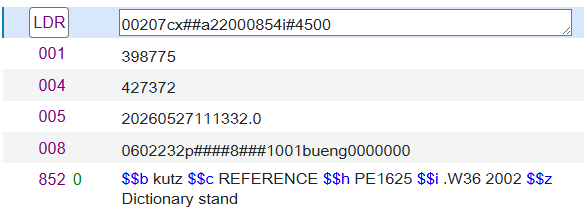
Fields
- Leader: Most should be correct by default.
- 008: Common values are listed below.
- (6)Receipt: 2=Received and complete
- (7)Method of Acqusition: p=Purchase, g=Gift
- (12)Retention Policy: 8=Permanently retained
- (16)Completeness: 1=Complete
- (20)Lendiing policy: a=Will lend
Item Record
General Comments
For most acquisitions, item records are very simple, but they can become quite complicated. The procedures noted below apply to items in the Main Collection. Look for more extensive item descriptions under the various formats.Tabs
- General: The most common variations occur in this area.
- Enum/Chron: This area only pertains to serial cataloging.
- Notes: This area can be used to alert the public or the circulation staff to particularies of the items. Used extensively in kit cataloging.
- History: Shows the changes made to the record.
General Tab
- General Information: For one-piece items, the 8 values shown below are sufficient.
- Barcode: This should be scanned last! Once the barcode is scanned the item record will automatically close!
- Material Type: "Book" is most common. Choose other types from the drop down list.
- Receiving Date: Supplied by the OPAC.
- Copy ID: Usually "1"
- Item policy: Choose this appropriate policy for the collection you are cataloging.
- Is Magnetic: This is almost always "No". There may be a few magnetic pieces in the CMC.
- Pieces: For an item this is usually "1". This is not the case for many items in the CMC.
- Receiving operator: Supplied by the OPAC.
- Inventory Information: Skip. We do not use this section.
- Location information: Skip. Supplied by OPAC from the holding information.
- Temporary Location Information: Skip. We do not use this section.
- Retention Information: Generally this is blank, but it should be used for items in the PA Collection. See Pennsylvania Collection procedures.