Contact Information
Michael Weber
610-683-4746
weber@kutztown.edu
Technical Services Manual
Accompanying CDs
Rohrbach Library Kutztown University
Kutztown, PA 19530
Go to:
Record edits
When audio CDs, DVDs, or computer discs accompany books, the following additional cataloging procedures are applied.300 $e - Accompanying material
Add a $e to the 300 field, if one is not already present. Choose the appropriate format from the examples listed below. Note that in some records "computer disc" may read "CD-ROM", and "videodisc (DVD)" may read "DVD".- Audio CD: xvi, 208 pages ; $c 29 cm + $e 1 sound disc (digital ; 4 /3/4 in.)
- Computer Disc: xvi, 208 pages ; $c 29 cm + $e 1 computer disc (sound, color ; 4 /3/4 in.)
- DVD Disc: xvi, 208 pages ; $c 29 cm + $e 1 videodisc (DVD ; 4 /3/4 in.)
949 - Local holdings
Local holding information MUST be recorded in a 949, IF the disc is shelved in its own separate container. A 949 field is optional, if the item is stored in the back of the book.- One disc: KZSS $a KZSS $v Disc
- Multiple discs: KZSS $a KZSS $d [$v=Disc] $v 1--3
Item Record
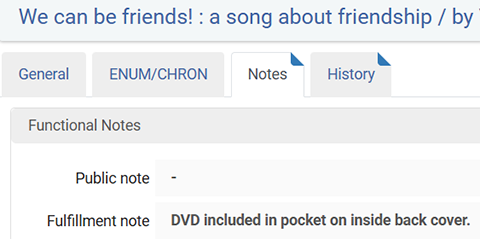
Add fulfillment note alerting staff that a disc accompanies the book.- Option 1: Item consists of 2 pieces
- Option 2: DVD included
- Option 3: DVD included in pocket on inside back cover.
End Processing
Disc surface
- Add Call number See DVD Processing, 3b
- Add Tattle tape: See DVD Processing, 4
Book
- Add CD/DVD Enclosed Label to the front of the book.
- Attach label to bottom right-hand quadrant of the book.
- Attach label 1/2" from the bottom and 1/2" from the fore-edge.
- Example

- Add a back pocket if the current pocket is insufficient or missing.